hvm-docs-refresh
8743fff510
hvm-docs-refresh
8743fff510
1161 content change(s) across 7 bundle(s)
1161 sidecar metadata update(s)
7 new bundle(s) added

Bundles with content changes:
  hvm_deployment_guide (NEW): 32 page(s)
    - GUID-0F55384D-5632-4CDC-AA39-A21C1C089AFA
    - GUID-28F18596-4902-4CD1-83F3-1411430C5534
    - GUID-2DD9D39D-9031-4BB5-A4ED-A0179BEF5259
    - GUID-34B1D00A-C42E-4691-8B4F-3B110E34FE7C
    - GUID-3DA92E9D-0635-427A-BA9D-5A7E475B55DB
    ... and 27 more
  hvm_release_notes_8_1_0 (NEW): 1 page(s)
    - sd00007497en_us
  hvm_release_notes_8_1_1 (NEW): 1 page(s)
    - sd00007609en_us
  hvm_release_notes_8_1_2 (NEW): 1 page(s)
    - sd00007734en_us
  hvm_user_manual_8_1_0 (NEW): 374 page(s)
    - GUID-008AF6CD-E219-4D76-B175-B763E5C397CE
    - GUID-02679208-A796-4A58-80AC-33DCF6A4899F
    - GUID-034C2E21-6B14-4AAD-A582-2638A4C7D04C
    - GUID-04410F73-1BA6-46D4-A7A4-E4706C5FD522
    - GUID-0503F050-177F-4360-9B1A-49439AF366B8
    ... and 369 more
  hvm_user_manual_8_1_1 (NEW): 376 page(s)
    - GUID-008AF6CD-E219-4D76-B175-B763E5C397CE
    - GUID-02679208-A796-4A58-80AC-33DCF6A4899F
    - GUID-034C2E21-6B14-4AAD-A582-2638A4C7D04C
    - GUID-04410F73-1BA6-46D4-A7A4-E4706C5FD522
    - GUID-0503F050-177F-4360-9B1A-49439AF366B8
    ... and 371 more
  hvm_user_manual_8_1_2 (NEW): 376 page(s)
    - GUID-008AF6CD-E219-4D76-B175-B763E5C397CE
    - GUID-02679208-A796-4A58-80AC-33DCF6A4899F
    - GUID-034C2E21-6B14-4AAD-A582-2638A4C7D04C
    - GUID-04410F73-1BA6-46D4-A7A4-E4706C5FD522
    - GUID-0503F050-177F-4360-9B1A-49439AF366B8
    ... and 371 more
4.1 KiB
Creating an HVM cluster
About this task
An HVM cluster is the basic unit of management in VM Essentials, you need to create a cluster even if you are only using one HVM host for testing or for edge data centers. A cluster is a construct that allows you to access the advanced functionality of the solution.
Once the VM Essentials manager is configured, you are ready to create your HVM cluster.
Procedure
-
Go to Infrastructure > Clusters and click + Add Cluster.

-
Select HVM as the cluster type and click Next.
-
Select the Group the cluster will belong to.

-
Give your cluster a name and, optionally, enter a description and any label to identify it.
NOTE
Only fields with a green mark on the left are mandatory.

-
Fill in the required fields.

- Leave the layout at the default HVM 1.2 Cluster on HVM/Ubuntu 24.04.
- For SSH Hosts, click the + sign on the right to add as many hosts as you need. Enter a name for each host and its management IP address. The exact name entered here is not vital as it's simply an identifier for that specific host within the user interface. It could be the hostname or some other identifier specific to that host.
- Enter an SSH Username and SSH Password. This is a set of credentials for an admin user account configured on each host.
-
Enter the network interfaces in the designated fields.

-
Management net interface: Enter the tagged bond you created for host management.
-
Compute net interface: To route virtual machine traffic using different VLANs through the same ports your management network uses, enter the untagged bond you created.
-
Compute VLANs: Enter any VLANs you need, the respective Portgroups will be created.
NOTE
- You can obtain the interface names from the host's CLI using the command:
ip address show. - Selecting the bond with NO TAGGING is crucial for the virtual switch to allow VLANs to flow through.
- You can obtain the interface names from the host's CLI using the command:
-
-
You can safely leave all the remaining settings by default. Here is a short description.

- CPU Type: Only x86_64 is supported.
- CPU Model: This setting will define the CPU used for virtual machines, you should leave it as “host-passthrough” unless your cluster nodes have different CPU families each.
- Dynamic placement: If enabled, the cluster will balance the load automatically by live migrating virtual machines between nodes.
- Power policy: Defines if the hosts will optimize for performance or for power consumption.
-
Click Next and then Complete.
You are taken back to the cluster screen where you’ll see your cluster name and an icon showing the cluster is being created.

-
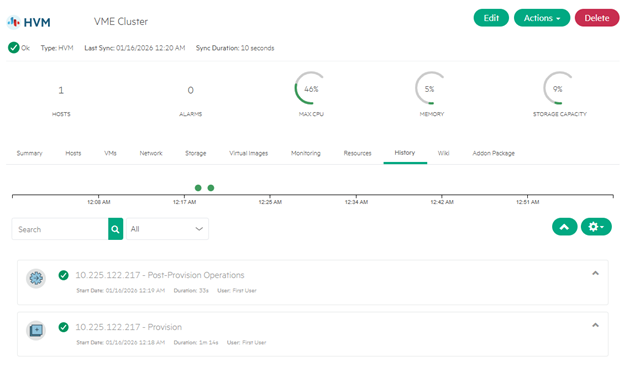
To follow up on the creation process, click on the cluster name and then go to the History tab. When the Provision and the Post-Provision activities finish with a green check mark, your cluster is ready to run virtual machines.