Compare commits
| Author | SHA1 | Date | |
|---|---|---|---|
 Nadine Dove Nadine Dove
|
6621cf5061 | ||
|
Nadine Dove
|
eed90c093e | ||
|
Nadine Dove
|
9aacf78031 | ||
|
Nadine Dove
|
81e9677c03 | ||
|
Nadine Dove
|
80433c78c4 | ||
|
Nadine Dove
|
4d4d094e70 |
@@ -51,6 +51,17 @@ jobs:
|
|||||||
- name: echo-step
|
- name: echo-step
|
||||||
run: echo "${{ github.event.release.target_commitish }}"
|
run: echo "${{ github.event.release.target_commitish }}"
|
||||||
|
|
||||||
|
- name: uploading archive to prod
|
||||||
|
if: ${{ steps.branch_name.outputs.branch == 'main' || github.event.release.target_commitish == 'main'}}
|
||||||
|
uses: wlixcc/[email protected]
|
||||||
|
with:
|
||||||
|
username: ${{ secrets.USERNAME }}
|
||||||
|
server: ${{ secrets.SERVER }}
|
||||||
|
ssh_private_key: ${{ secrets.SSH_PRIVATE_KEY }}
|
||||||
|
local_path: ${{ github.event.repository.name }}_${{ steps.tag_name.outputs.tag }}.zip
|
||||||
|
remote_path: '${{ secrets.STG_UPLOAD_URL }}'
|
||||||
|
args: '-o ConnectTimeout=5'
|
||||||
|
|
||||||
- name: uploading archive to staging
|
- name: uploading archive to staging
|
||||||
if: ${{ steps.branch_name.outputs.branch == 'develop' || github.event.release.target_commitish == 'develop' }}
|
if: ${{ steps.branch_name.outputs.branch == 'develop' || github.event.release.target_commitish == 'develop' }}
|
||||||
uses: wlixcc/[email protected]
|
uses: wlixcc/[email protected]
|
||||||
@@ -61,3 +72,4 @@ jobs:
|
|||||||
local_path: ${{ github.event.repository.name }}_${{ steps.tag_name.outputs.tag }}.zip
|
local_path: ${{ github.event.repository.name }}_${{ steps.tag_name.outputs.tag }}.zip
|
||||||
remote_path: '${{ secrets.STG_UPLOAD_URL }}'
|
remote_path: '${{ secrets.STG_UPLOAD_URL }}'
|
||||||
args: '-o ConnectTimeout=5'
|
args: '-o ConnectTimeout=5'
|
||||||
|
|
||||||
|
|||||||
@@ -1,3 +1,3 @@
|
|||||||
booktitle=ZIC for AWS Installation Guide - GitHub version
|
booktitle=Zerto In-Cloud (ZIC) for Amazon Web Services (AWS) v1.1 - Installation, Configuration and Operation Guide
|
||||||
spreadsheet.xml=classification.xml
|
spreadsheet.xml=classification.xml
|
||||||
manual.name=ZIC_1.1.HTML
|
manual.name=ZIC_1.1.HTML
|
||||||
@@ -1,8 +0,0 @@
|
|||||||
1. Connect to ZIC using the URL [https://zic-ip-address](https://zic-ip-address) to validate it is online.
|
|
||||||
2. The installer will prompt you for a username and password. Log in with the username and password generated in the ZIC download page in myZerto.
|
|
||||||
3. The online installer will pull the latest code from myZerto and perform the installation.
|
|
||||||
|
|
||||||

|
|
||||||
|
|
||||||
4. Log in using the default "admin" for both user and password for the first time.
|
|
||||||
3. At the prompt change the admin password.
|
|
||||||
@@ -1,16 +1,6 @@
|
|||||||
#### Obtain the Image Pull Image
|
# Deploying the ZIC Instance
|
||||||
|
|
||||||
The image pull key secret is used in the deployment to enable downloading Zerto’s component images. Follow these steps to obtain the image pull key secret.
|
First you must Obtaining the Image Pull Key Secret. After you receive the email notification that your AWS Account ID was added to the privately published AMI, continue with the following configuration, deployment and installation steps.
|
||||||
|
|
||||||
1. Log in to myZerto.
|
|
||||||
2. Navigate to **Support & Downloads > Software Downloads > Zerto In-Cloud**.
|
|
||||||
3. Click **Download Online Installer** to download the installer.
|
|
||||||
4. Click **Download Primary Account IAM Policy** to download the policy files.
|
|
||||||
5. Click **Download Collection** to download collection for Postman.
|
|
||||||
6. Click **Username and Password** and generate keys.
|
|
||||||
7. Copy the Username and Password keys to a local file so you have access to them when you need this information later when installing Zerto software.
|
|
||||||
|
|
||||||
The account team will send an email notification that your AWS Account ID was added to the privately published AMI. After you receive the email notification continue with the following configuration, deployment and installation steps.
|
|
||||||
|
|
||||||
#### AWS Configuration
|
#### AWS Configuration
|
||||||
|
|
||||||
@@ -58,4 +48,14 @@ The account team will send an email notification that your AWS Account ID was ad
|
|||||||
```
|
```
|
||||||
|

|
||||||
|
|
||||||
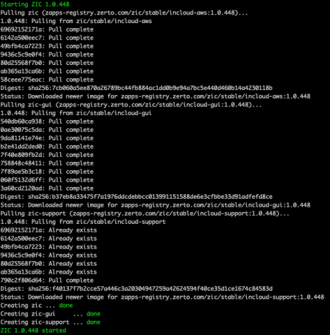
When the installation completes, it will display “Starting ZIC 1.0.x” and continues displaying the status until it displays “ZIC 1.0.x started”. You can now connect to ZIC.
|
When the installation completes, it will display “Starting ZIC 1.0.x” and continue displaying status until it displays “ZIC 1.0.x started”. You can now connect to ZIC.
|
||||||
|
|
||||||
|
#### Connecting to ZIC
|
||||||
|
|
||||||
|
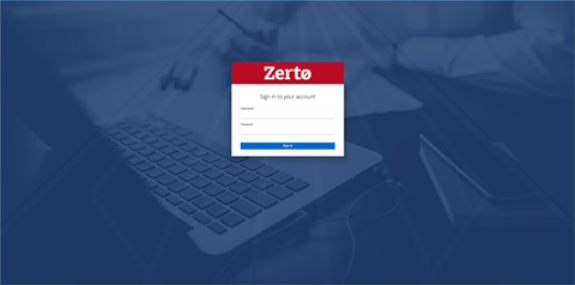
1. Connect to ZIC using the URL [https://zic-ip-address](https://zic-ip-address) to validate it is online.
|
||||||
|
2. The installer will prompt you for a username and password. Log in with the username and password generated in the ZIC download page in myZerto.
|
||||||
|
3. The online installer will pull the latest code from myZerto and perform the installation.
|
||||||
|
|
||||||
|
4. Log in using the default "admin" for both user and password for the first time.
|
||||||
|
3. At the prompt change the admin password.
|
||||||
|
|
||||||

|
Before Width: | Height: | Size: 12 KiB |

|
Before Width: | Height: | Size: 123 KiB |

|
Before Width: | Height: | Size: 90 KiB |

|
Before Width: | Height: | Size: 38 KiB |

|
Before Width: | Height: | Size: 5.0 KiB |

|
Before Width: | Height: | Size: 5.1 KiB |

|
Before Width: | Height: | Size: 18 KiB |

|
Before Width: | Height: | Size: 30 KiB |

|
Before Width: | Height: | Size: 28 KiB |

|
Before Width: | Height: | Size: 27 KiB |

|
Before Width: | Height: | Size: 23 KiB |

|
Before Width: | Height: | Size: 16 KiB |

|
Before Width: | Height: | Size: 23 KiB |

|
Before Width: | Height: | Size: 30 KiB |

|
Before Width: | Height: | Size: 2.0 KiB |

|
Before Width: | Height: | Size: 56 KiB |

|
Before Width: | Height: | Size: 34 KiB |

|
Before Width: | Height: | Size: 34 KiB |

|
Before Width: | Height: | Size: 30 KiB |

|
Before Width: | Height: | Size: 12 KiB |

|
Before Width: | Height: | Size: 20 KiB |

|
Before Width: | Height: | Size: 23 KiB |

|
Before Width: | Height: | Size: 11 KiB |

|
Before Width: | Height: | Size: 49 KiB |

|
Before Width: | Height: | Size: 21 KiB |

|
Before Width: | Height: | Size: 30 KiB |

|
Before Width: | Height: | Size: 34 KiB |

|
Before Width: | Height: | Size: 35 KiB |

|
Before Width: | Height: | Size: 36 KiB |

|
Before Width: | Height: | Size: 62 KiB |

|
Before Width: | Height: | Size: 31 KiB |

|
Before Width: | Height: | Size: 28 KiB |

|
Before Width: | Height: | Size: 35 KiB |

|
Before Width: | Height: | Size: 37 KiB |

|
Before Width: | Height: | Size: 53 KiB |

|
Before Width: | Height: | Size: 7.4 KiB |

|
Before Width: | Height: | Size: 113 KiB |

|
Before Width: | Height: | Size: 98 KiB |

|
Before Width: | Height: | Size: 30 KiB |

|
Before Width: | Height: | Size: 45 KiB |

|
Before Width: | Height: | Size: 76 KiB |

|
Before Width: | Height: | Size: 64 KiB |

|
Before Width: | Height: | Size: 46 KiB |

|
Before Width: | Height: | Size: 52 KiB |

|
Before Width: | Height: | Size: 77 KiB |

|
Before Width: | Height: | Size: 65 KiB |

|
Before Width: | Height: | Size: 87 KiB |

|
Before Width: | Height: | Size: 45 KiB |

|
Before Width: | Height: | Size: 44 KiB |

|
Before Width: | Height: | Size: 51 KiB |

|
Before Width: | Height: | Size: 24 KiB |

|
Before Width: | Height: | Size: 95 KiB |

|
Before Width: | Height: | Size: 26 KiB |

|
Before Width: | Height: | Size: 89 KiB |

|
Before Width: | Height: | Size: 12 KiB |

|
Before Width: | Height: | Size: 23 KiB |

|
Before Width: | Height: | Size: 88 KiB |

|
Before Width: | Height: | Size: 27 KiB |

|
Before Width: | Height: | Size: 40 KiB |

|
Before Width: | Height: | Size: 73 KiB |

|
Before Width: | Height: | Size: 15 KiB |

|
Before Width: | Height: | Size: 64 KiB |

|
Before Width: | Height: | Size: 35 KiB |

|
Before Width: | Height: | Size: 14 KiB |

|
Before Width: | Height: | Size: 48 KiB |

|
Before Width: | Height: | Size: 5.2 KiB |

|
Before Width: | Height: | Size: 5.2 KiB |

|
Before Width: | Height: | Size: 18 KiB |

|
Before Width: | Height: | Size: 18 KiB |

|
Before Width: | Height: | Size: 13 KiB |

|
Before Width: | Height: | Size: 13 KiB |

|
Before Width: | Height: | Size: 33 KiB |

|
Before Width: | Height: | Size: 47 KiB |

|
Before Width: | Height: | Size: 4.2 KiB |

|
Before Width: | Height: | Size: 4.3 KiB |

|
Before Width: | Height: | Size: 12 KiB |

|
Before Width: | Height: | Size: 27 KiB |

|
Before Width: | Height: | Size: 1.4 KiB |

|
Before Width: | Height: | Size: 25 KiB |

|
Before Width: | Height: | Size: 18 KiB |

|
Before Width: | Height: | Size: 16 KiB |

|
Before Width: | Height: | Size: 21 KiB |

|
Before Width: | Height: | Size: 27 KiB |

|
Before Width: | Height: | Size: 12 KiB |

|
Before Width: | Height: | Size: 7.5 KiB |

|
Before Width: | Height: | Size: 37 KiB |

|
Before Width: | Height: | Size: 20 KiB |

|
Before Width: | Height: | Size: 10 KiB |

|
Before Width: | Height: | Size: 73 KiB |

|
Before Width: | Height: | Size: 46 KiB |

|
Before Width: | Height: | Size: 421 KiB |

|
Before Width: | Height: | Size: 114 KiB |

|
Before Width: | Height: | Size: 29 KiB |

|
Before Width: | Height: | Size: 65 KiB |

|
Before Width: | Height: | Size: 182 KiB |

|
Before Width: | Height: | Size: 250 KiB |