Nadine Dove
2.5 KiB
2.5 KiB
Configuring ZIC To Use Access Token from Keycloak
Zerto In-Cloud overcomes the AWS 20 concurrent snapshot copy limits between source and target regions by allowing you to use multiple AWS Accounts as Scale Accounts. Scale Accounts effectively multiply the number of concurrent snapshots that can be replicated for much lower RPOs.
Use these steps to configure Zerto In-Cloud an IAM Policy and assign roles for ZIC Scale Accounts.
- Log into the scale account.
- Navigate to IAM - Policies.
- Create a Policy.
- Create Roles.
Create a Policy
- Navigate to the JSON tab, copy and paste the following:
	"Version": "2012-10-17",
	"Statement": [
	{
		"Sid":
		"VisualEditor0",
		"Effect": "Allow",
		"Action": [
		"ec2:CopySnapshot",
		"ec2:DeleteSnapshot",
		"ec2:CreateSnapshots",
		"ec2:ModifySnapshotAttribute",
		"ec2:DescribeInstanceTypeOfferings",
		"ec2:CreateVolume",
		"ec2:AttachVolume",
		"ec2:DetachVolume",
		"ec2:ModifyVolume",
		"ec2:DeleteVolume",
		"ec2:CreateTags",
		"ec2:RunInstances",
		"ec2:DescribeImages",
		"ec2:DescribeSnapshots",
		"ec2:DescribeRegions",
		"ec2:DescribeInstances",
		"ec2:DescribeAvailabilityZones",
		"ec2:DescribeVpcs",
		"ec2:DescribeSecurityGroups",
		"ec2:DescribeNetworkInterfaces",
		"ec2:DescribeSubnets",
		"ec2:DescribeVolumes",
		"ec2:DescribeVolumeStatus",
		"ec2:DescribeInstanceAttribute",
		"ec2:DescribeInstances",
		"ec2:DescribeTags",
		"ec2:ModifyInstanceAttribute",
		"ec2:RunInstances",
		"ec2:ModifyInstanceAttribute",
		"ec2:ModifyNetworkInterfaceAttribute",
		"ec2:StartInstances",
		"ec2:TerminateInstances",
		"ec2:CreateTags",
		"ec2:DeleteTags",
		"ec2:StopInstances",
		"dynamodb:DescribeTable",
		"dynamodb:CreateTable",
		"dynamodb:PutItem",
		"dynamodb:Scan",
		"dynamodb:GetItem",
		"dynamodb:DeleteItem",
		"dynamodb:Query",
		"dynamodb:BatchGetItem",
		"dynamodb:DeleteTable",
		"dynamodb:ListTables",
		"sts:AssumeRole",
		"iam:passRole",
		"kms:CreateGrant",
		"kms:Decrypt",
		"kms:DescribeKey",
		"kms:GenerateDataKeyWithoutPlainText",
		],
	"Resource": "*"
	}
  ]
}
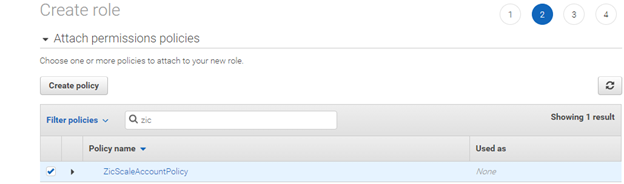
- Name the policy ZicScaleAccountPolicy and Save.
Create Roles
-
Go to Roles.
-
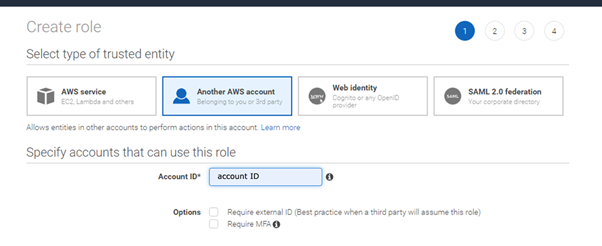
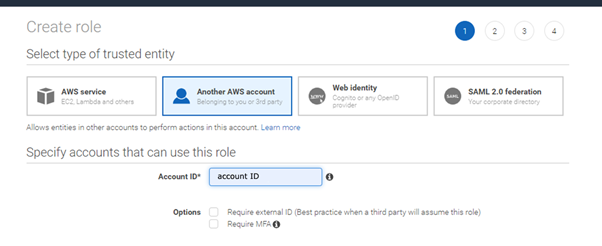
Create role - Another AWS account.
-
In Account ID insert the Deployment account. Click Next.
-
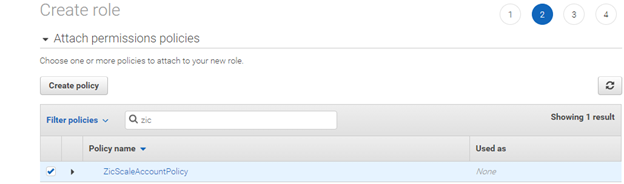
Select the policy you created. Click Next.
-
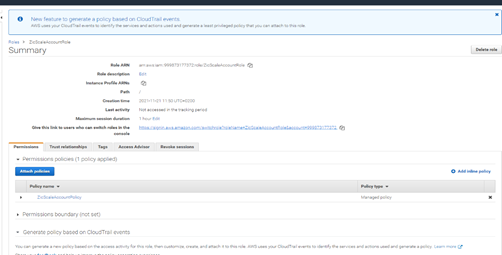
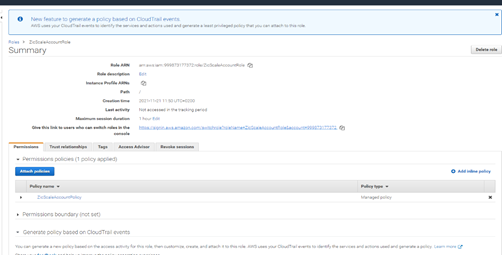
Name the Role ZicScaleAccountRole.