mirror of
https://github.com/recklessop/Zerto_Exporter.git
synced 2026-07-03 07:53:15 -04:00
 Hamid Hosseinzadeh
46 lines
1.2 KiB
Markdown
46 lines
1.2 KiB
Markdown
## About the app
|
|
|
|
In one particilar project, i had to import some key/value data to Prometheus. So i have decided to create my custom-built Node Exporter in Python, then dockerize it and share it in my Github account.
|
|
|
|
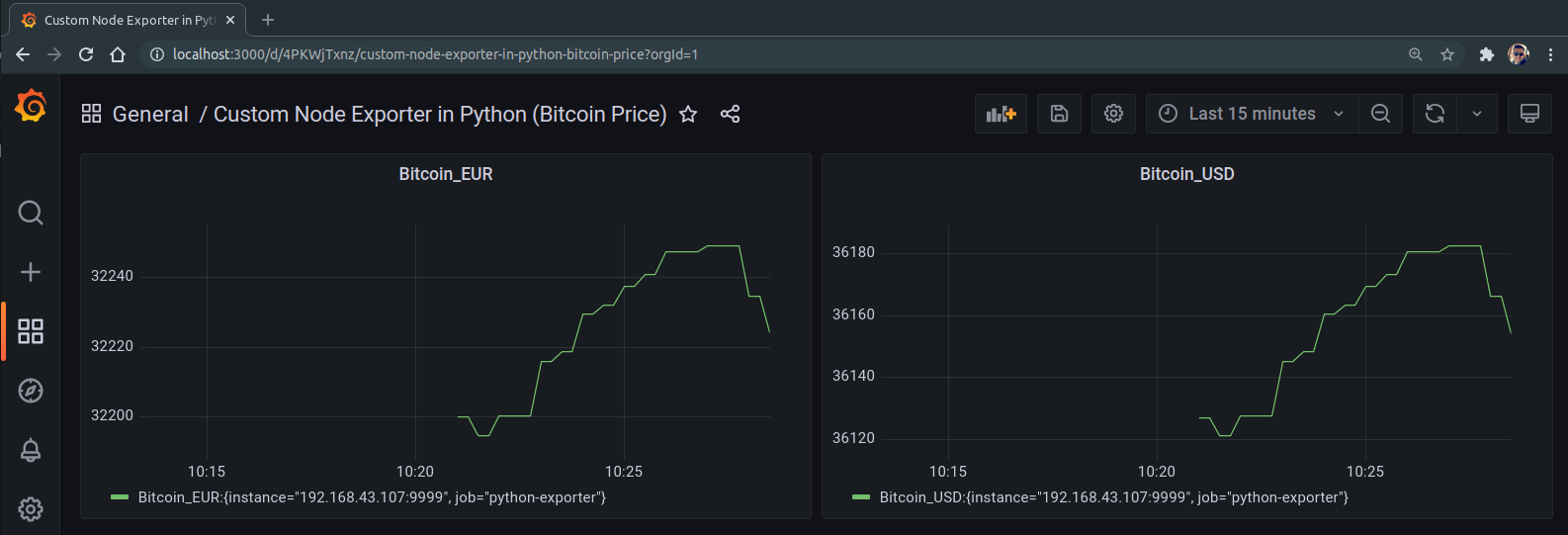
In this example, i used API to get Bitcoin price in Dollar and Euro, import it in the Prometheus and visualize it using Grafana. You can import any data using your own Python scripts.
|
|
|
|
|
|
## Run Program
|
|
|
|
Login to the server where you want to run this exporter and clone the project:
|
|
|
|
```bash
|
|
git clone https://github.com/hmdhszd/Custom_Prometheus_Node_Exporter-in-Python.git
|
|
```
|
|
|
|
Go to the project directory:
|
|
|
|
```bash
|
|
cd Custom_Prometheus_Node_Exporter-in-Python
|
|
```
|
|
|
|
Build image and start the container:
|
|
|
|
```bash
|
|
docker-compose up -d --build --force-recreate
|
|
```
|
|
|
|
|
|
|
|
## Add the exporter to Prometheus
|
|
|
|
Add this part at the end of the configuration of your Prometheus (prometheus.yaml):
|
|
|
|
```bash
|
|
- job_name: python-exporter
|
|
metrics_path: /metrics.txt
|
|
static_configs:
|
|
- targets: ['<IP-of-Node-Exporter-Server>:9999']
|
|
```
|
|
|
|
|
|
## Add Grafana dashboards using imported items
|
|
|
|
|
|
|